


1. 2048 Rogue Game Overview
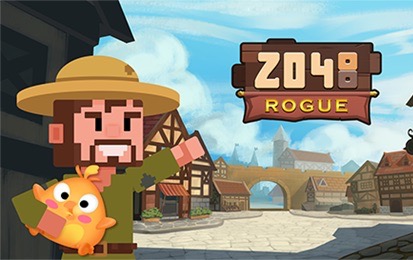
2048 Rogue reimagines the familiar slide-and-merge puzzle as a roguelike-flavored journey filled with evolving creatures, objects, and story fragments. Instead of combining plain numbered tiles, players join matching icons to transform them into stronger forms. Every arrow-key move shifts the entire grid, merges compatible pairs, and introduces a new tile, so one decision can open a route or crowd the board.
The core challenge remains spatial management. Matching tiles must be brought together without scattering high-tier forms or filling every lane with incompatible icons. Because all tiles slide at once, a move that completes one merge may disturb several future combinations. The run ends when the board has no legal movement or merge remaining.
What makes this version special is the surrounding progression. Endless mode emphasizes classic survival and high scores, while Story mode connects merges to character moments and town mysteries. The source also describes an undo feature for correcting mistakes, a global leaderboard for comparing results, and live chat for discussing strategies. Those systems give the compact puzzle a more social and adventurous identity. 2048 Rogue is ideal for players who already understand merging games but want more visual personality, as well as newcomers drawn to creature evolution and low-pressure planning. A session can be short, yet discovering the next form provides a strong reason to continue.
Key Details:
| Genre: | Merge Puzzle / Roguelike-Inspired |
| Difficulty Level: | Medium and progressively harder |
| Average Play Time: | 8–25 minutes |
| Best For: | 2048 fans, collection-minded players, and strategic puzzle solvers |
2. How to Play 2048 Rogue
Getting Started:
- Choose Story or Endless mode when the option is available.
- Press an arrow key to slide every tile in that direction.
- Bring two identical icons together so they merge into a higher form.
- Keep high-tier tiles organized while preserving empty grid cells.
- Continue until no slide can move or merge any tile.
Basic Controls:
- Arrow Keys: Slide the full board up, down, left, or right.
- Undo: Use the on-screen undo control when available to reverse a recent mistake.
Objective: Create the highest possible evolved forms, survive as long as possible, and pursue story or leaderboard progress depending on the selected mode.
3. 2048 Rogue Features & Highlights
- ✓ Creature and object evolution gives every merge a visual reward
- ✓ Story and Endless modes support both structured and open-ended play
- ✓ Undo encourages experimentation without removing strategic pressure
- ✓ Global leaderboard results create a long-term score challenge
- ✓ Narrative fragments and live chat extend the puzzle beyond one grid
4. 2048 Rogue Tips & Strategies
Beginner Tips:
- Choose one corner for the highest-tier form and keep it there.
- Favor two main movement directions so the board remains ordered.
- Preserve at least one empty lane for repositioning tiles.
Advanced Strategies:
- Build descending tiers along one edge so new matches feed toward the corner.
- Avoid moves that pull the highest tile away unless they create a necessary recovery.
- Use undo to study why a position failed, not simply to repeat random alternatives.
What to Watch Out For:
- Every move can spawn a new tile, so meaningless slides accelerate board congestion.
- Chasing one merge in the center can break the ordered chain supporting several higher forms.
5. 2048 Rogue Game Elements Explained
Sliding, Merging, and Evolution: An input moves every tile as far as possible in one direction. When two identical forms collide, they combine into the next tier. A pair normally merges once during that movement, so planning must account for where the new form will stop. The board becomes safer when high-tier icons are anchored in a corner and lower tiers form an ordered chain nearby. This structure funnels new tiles toward useful matches and prevents large forms from blocking the center. Empty cells are mobility, not wasted space. They allow the grid to rearrange and provide room for newly spawned tiles after each valid move. Before pressing an arrow, mentally simulate all rows and columns, not only the pair you want to merge. A move may join one set while separating another or dislodging the corner tile. Evolution is both the scoring reward and a compression tool: two occupied cells become one stronger cell. Efficient merging therefore creates space at the same time it reveals new creatures or objects.
Modes, Undo, and Competitive Progress: Endless mode focuses on the pure board loop: merge upward, keep space available, and extend the run for a higher result. Story mode uses the same decisions to reveal narrative fragments and explore character or town details described by the source. The modes provide different motivation without discarding the central mechanic. Undo acts as a safety tool. It can rescue an accidental key press or let players compare a position before and after a risky slide. Because repeated undo use may be limited by the interface, reserve it for moves that damage the core structure rather than minor inefficiencies. Leaderboards translate each run into a competitive benchmark, rewarding consistency and high-tier evolution. Live chat offers a place to compare approaches, but never share private information. Progress across these systems comes from the same fundamentals: ordered edges, deliberate inputs, and a willingness to end weak patterns early. Treat Story discoveries as milestones and leaderboard scores as evidence of improving board control, not as reasons to make hurried moves.
6. 2048 Rogue Frequently Asked Questions
Q: How do I merge two tiles?
A: Press an arrow key that slides two identical icons into one another with no blocking tile between them.
Q: What should I do when the board is almost full?
A: Look for a move that creates several merges at once, protect the highest corner tile, and avoid slides that add a new tile without opening space.
Q: Is 2048 Rogue compatible with mobile and desktop browsers?
A: The source explicitly documents arrow-key control, so desktop is the clearest supported setup. Mobile play depends on whether the current build supplies swipe input.
Q: Can I save my progress?
A: Story milestones or scores may be retained by the game, but the source does not explain cloud saving for an unfinished board. Avoid clearing browser data.
Q: How do I unlock higher creature forms?
A: Repeatedly merge identical lower-tier tiles. Each successful pair evolves into the next form in the sequence.