







1. Card Cafe Game Overview
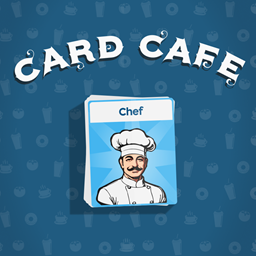
Card Cafe combines restaurant management with a card-based crafting puzzle. Ingredients, appliances, prepared foods, and useful objects all appear as cards on a workbench. Customers arrive with orders, and the player must transform the available cards into the requested dishes or drinks. Instead of controlling a chef directly, you build recipes by stacking or combining the correct cards.
The theme is a growing neighborhood cafe, but the underlying challenge is organization. A banana, milk, fish, stove, or beaten egg is not decorative inventory; each card has a role in a production chain. For example, combining the required cooking equipment with a prepared ingredient can create a finished omelette card. That result can then be served to a waiting customer for money. Earnings unlock new cards, recipes, and upgrades, allowing the cafe to prepare more complex and valuable orders.
Card Cafe stands out because every business decision happens on the same physical-looking table. Poorly arranged cards consume space and make recipes harder to assemble, while a clean layout lets players see ingredients, stations, and completed dishes at a glance. The game is relaxed enough for experimentation but becomes increasingly strategic as the card collection expands. It is ideal for players who enjoy crafting chains, light management, and the satisfying rhythm of turning a few simple resources into a productive food operation.
Key Details:
| Genre: | Card-Based Management / Cooking / Strategy |
| Difficulty Level: | Easy to Medium |
| Average Play Time: | 15–40 minutes per session |
| Best For: | Cozy-game fans, crafting enthusiasts, and players who enjoy organizing systems |
2. How to Play Card Cafe
Getting Started:
- Read the customer's order and identify the required final dish or drink.
- Find the relevant ingredient and equipment cards on the workbench.
- Drag compatible cards together in the sequence required by the recipe.
- Serve the completed dish card to the customer and collect payment.
- Spend earnings on new cards and cafe upgrades that expand future recipes.
Basic Controls:
- Mouse: Left-click buttons and cards; click-drag to move or combine cards.
- Keyboard: Press Space or P to pause and plan.
Objective: Fulfill customer orders efficiently, earn money, unlock better resources, and grow the cafe into a faster and more capable operation.
3. Card Cafe Features & Highlights
- ✓ Card stacking turns familiar cooking recipes into a tactile puzzle
- ✓ Customer orders provide clear short-term production goals
- ✓ Unlockable cards expand the menu and create deeper crafting chains
- ✓ Cafe upgrades improve efficiency and support long-term growth
- ✓ Freeform table organization rewards planning without demanding fast controls
4. Card Cafe Tips & Strategies
Beginner Tips:
- Keep ingredients, appliances, and finished dishes in separate areas of the table.
- Learn one recipe chain completely before unlocking several new cards at once.
- Pause whenever the workbench becomes confusing and reorganize before serving.
Advanced Strategies:
- Pre-process common ingredients so high-frequency orders can be completed quickly.
- Place cards used together near one another to reduce unnecessary dragging.
- Invest first in upgrades that remove the current production bottleneck.
What to Watch Out For:
- Unlocking too many items without organizing them can fill the work area with clutter.
- Combining cards impulsively may consume an ingredient needed for a more valuable order.
5. Card Cafe Game Elements Explained
Recipe and Card-Combination System: Every recipe in Card Cafe is a small production tree. Raw ingredient cards are the starting resources, processing or appliance cards perform transformations, and a finished food card is the deliverable. Cards must be combined in valid relationships rather than merely placed close together. A beaten egg paired with the correct cooking station, for example, can become an omelette. More advanced recipes may require intermediate steps, so the order of operations matters. The system rewards learning through observation: when a combination works, remember both the ingredients and the tool that produced it. Arrange the table to reflect those relationships, with raw resources feeding into preparation zones and final dishes moving toward the serving area. This reduces mistakes and makes new recipes easier to understand. If a combination fails, separate the cards and review the requested item instead of repeatedly stacking random objects. Because cards also occupy valuable space, recipe knowledge improves both speed and organization. Efficient production is less about rapid clicking than about designing a clear, repeatable path from ingredient to customer.
Cafe Economy, Unlocks, and Upgrades: Completed orders generate money, which turns successful cooking into long-term progression. New card unlocks expand the ingredient pool, equipment selection, and menu possibilities. More complex dishes can create better opportunities, but they also add steps and consume table space. Upgrades improve the cafe's facilities or production efficiency, helping the same workbench handle greater demand. Spend with a purpose. If one appliance creates a queue, improve that part of the chain before buying unrelated ingredients. If customers frequently request items you cannot make, unlocking the missing recipe component may be more valuable. The economy works best as a feedback loop: serve reliable dishes, invest the earnings in a targeted improvement, then use that improvement to complete more advanced orders. Avoid expanding faster than you can organize. A large collection is not automatically a productive cafe. The strongest setup is one where every unlocked card has a known location and use, and where money is directed toward the process that currently limits service speed or order value.
6. Card Cafe Frequently Asked Questions
Q: How do I combine cards into a dish?
A: Drag a required ingredient onto the compatible preparation or appliance card, then continue the recipe chain until the finished dish appears.
Q: What should I do if the workbench is too crowded?
A: Pause with Space or P, separate cards by function, and move completed or low-priority items away from active recipe areas.
Q: Is Card Cafe compatible with mobile and desktop browsers?
A: The game is browser-based, but its source instructions specifically emphasize left-click and drag controls. Desktop play offers the clearest supported interaction.
Q: Can I save my progress?
A: The source page does not state whether progress is stored in the cloud. If the game saves locally, clearing browser storage or changing devices may reset unlocks.
Q: How do I unlock more recipes and equipment?
A: Serve customer orders to earn money, then use the available shop or upgrade controls to purchase new cards and cafe improvements.