

1. Hockey Random Game Overview
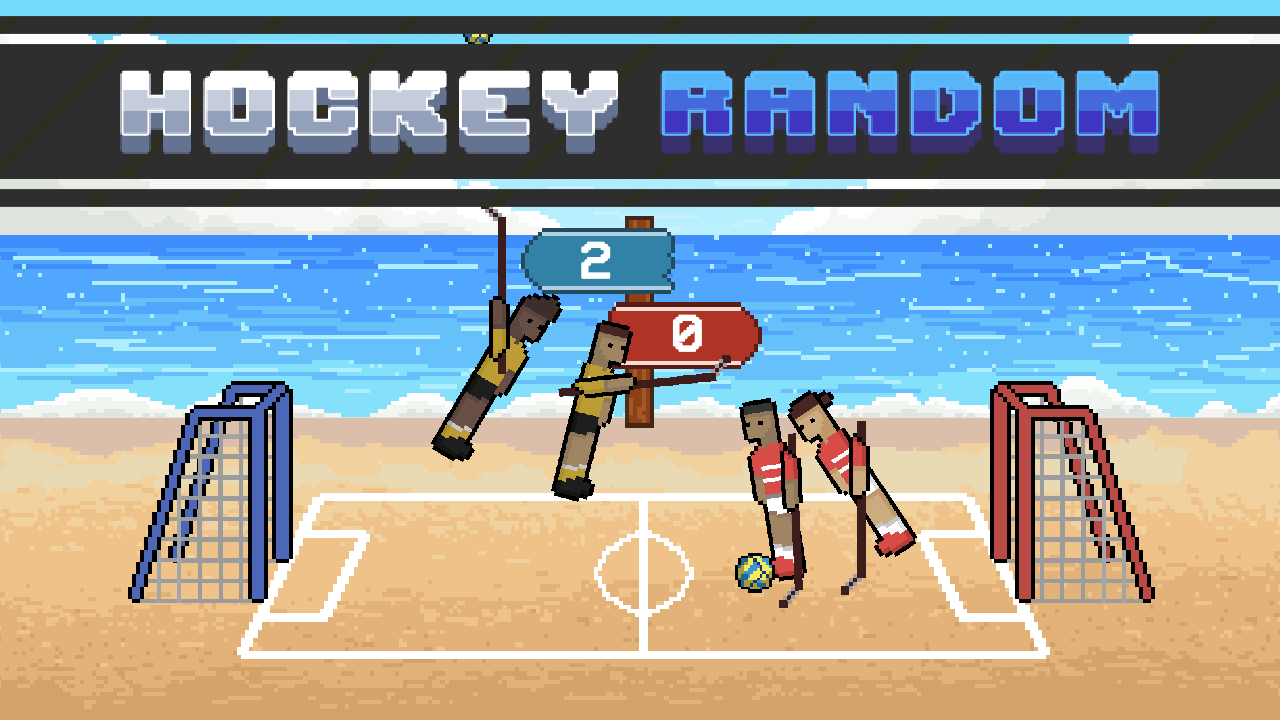
Hockey Random compresses an ice-hockey contest into a playful one-button physics duel. Players control small teams that jump, slide, and swing toward the puck while gravity, collisions, walls, and changing momentum influence every attempt. A clean shot may travel directly into the goal, while an awkward bounce can create an unexpected score at either end.
The game supports one-player competition against the CPU and local two-player matches. Player One uses W and Player Two uses the Up Arrow, so the entire tactical challenge is expressed through timing. There are no complicated skating directions to memorize. Instead, players observe the puck, predict how the characters will move when activated, and choose the moment most likely to produce a shot, block, or recovery.
Hockey Random is deliberately less controlled than a sports simulation. That does not remove skill; it changes the kind of skill required. Strong players use the rink boundaries, react to loose pucks, and avoid pressing when the team's current pose would send the play in the wrong direction. Every restart can introduce a new physical situation, keeping short rounds fresh and making comebacks common. The game is especially effective as a local party challenge because both players share the same simple rules and can laugh at the same improbable goals. It also works as a quick solo reflex game for anyone who enjoys sports filtered through ragdoll chaos.
Key Details:
| Genre: | Physics Sports / Hockey / Two-Player |
| Difficulty Level: | Easy to control, Variable in play |
| Average Play Time: | 3–8 minutes |
| Best For: | Friends sharing a keyboard, arcade sports fans, and casual players |
2. How to Play Hockey Random
Getting Started:
- Select one-player or two-player mode.
- Watch the puck and the current position of your team.
- Press the action key to make the players jump, slide, or strike through the physics system.
- Use good timing to shoot at the opposing goal or interrupt an incoming attack.
- Score more goals and reach the match target before the opponent.
Basic Controls:
- Player 1: W
- Player 2: Up Arrow
Objective: Direct the puck into the opposing goal while keeping it away from your own net.
3. Hockey Random Features & Highlights
- ✓ Single-button play makes local competition instantly accessible
- ✓ Physics-driven puck movement produces unusual rebounds and goals
- ✓ CPU and shared-keyboard modes support solo or social play
- ✓ Walls and positioning allow creative defensive and attacking bounces
- ✓ Fast restarts keep matches active after every score
4. Hockey Random Tips & Strategies
Beginner Tips:
- Keep your eyes on the puck rather than on the player animation.
- Time an action as the puck enters striking range.
- Defend first when the puck is moving toward your own goal.
Advanced Strategies:
- Use wall rebounds to change the puck's angle around a defender.
- Press after an opponent commits so their team cannot immediately counter.
- Adjust timing to the current body pose instead of repeating a constant rhythm.
What to Watch Out For:
- A panicked defensive action can redirect the puck into your own net.
- Powerful contact is not useful when the player's angle sends the puck away from the target.
5. Hockey Random Game Elements Explained
Puck Physics and Environmental Rebounds: The puck responds to impact direction, speed, gravity, and contact with the arena boundaries. It can slide beneath a player, bounce from a wall, rise after a collision, or change direction through a crowded exchange. Because the control key triggers team movement rather than directly aiming the puck, the position at the instant of contact matters. A forward-moving stick or body sends a stronger attacking shot; a descending or backward pose may produce a weak clearance. Walls are not merely obstacles. A controlled rebound can move the puck around a rival or return it toward the center when a direct route is blocked. Learn the typical rebound angle by watching where the puck travels after each edge contact. On defense, place action timing between the puck and your goal rather than chasing after it has already passed. On offense, wait for a favorable approach instead of striking every loose puck immediately. The environment makes each rally uncertain, but reading momentum greatly improves the odds of useful contact.
One-Button Team Control and Match Flow: One input controls the active movement of the team, so attack and defense use the same command. Context decides which function it serves. Near the opposing goal, a press may become a shot; near your own goal, it may become a block; at center ice, it may reposition players around the puck. The limited control prevents micromanagement and emphasizes anticipation. Each goal resets the contest, removing the previous position and creating a new opening situation. Use those restarts to change rhythm. An opponent who presses immediately can sometimes be punished by waiting for their motion to finish. A passive opponent may give you space to act first. The score target keeps the match short enough that each goal matters, yet several rounds of play leave room for recovery. Rather than treating an unlucky bounce as a failure of control, focus on the next readable moment. Consistent success comes from making more well-timed actions across the match, not from eliminating all randomness.
6. Hockey Random Frequently Asked Questions
Q: How do I hit the puck?
A: Press W for Player One or Up Arrow for Player Two when your character is positioned to make contact.
Q: What should I do if I keep scoring own goals?
A: Stop pressing while the puck is already moving safely away, and time defensive actions to contact it from the goal side.
Q: Is Hockey Random compatible with mobile and desktop browsers?
A: The original page focuses on keyboard controls, so desktop is the clearest supported platform. Mobile play requires on-screen controls if the build provides them.
Q: Can I save my progress?
A: Each match is a short standalone session and no mid-match save feature is documented.
Q: How do I unlock two-player mode?
A: Choose the two-player option from the mode menu. Both players then share one keyboard using W and Up Arrow.