

1. Google Solitaire Game Overview
Google Solitaire is a clean, well-built digital version of classic Klondike solitaire — the card game that has defined the solo card game genre for decades. Instantly familiar to virtually everyone who has spent time on a computer, it delivers the reliable, satisfying loop of tableau organization and foundation building in a package that requires no setup, no download, and no learning curve.
The game adds one meaningful layer of player choice: Easy and Hard modes. The difference is in how cards are drawn from the stockpile — Easy draws one card at a time, giving you maximum flexibility over when and how you access stockpile cards. Hard draws in increments of three, revealing only every third card, which significantly constrains your stockpile access and forces more careful early-game tableau management. Both modes use the same rules for tableau movement (descending order, alternating colors) and foundation building (Ace to King by suit) — the draw mechanic alone changes the difficulty character of the experience.
What Google Solitaire does particularly well is its implementation of the core mechanics without unnecessary complexity. The alternating-color tableau stacking, the foundation building by suit, the stockpile — all of it is clean, fast, and responsive. A time tracker records how long your session takes without imposing any time pressure, giving you a personal benchmark to improve against without the anxiety of a countdown.
For players returning to solitaire after a break, or anyone who wants a reliable daily card game that works on any device without fuss, Google Solitaire is a dependable choice.
Key Details:
| Genre: | Card Game / Solitaire |
| Difficulty Level: | Easy or Hard (player choice at start) |
| Average Play Time: | 10–20 minutes per game |
| Best For: | Solitaire players of all experience levels; ideal for casual daily play or relaxed card game sessions |
2. How to Play Google Solitaire
Getting Started:
- Choose Easy (draw one) or Hard (draw three) mode at the start screen.
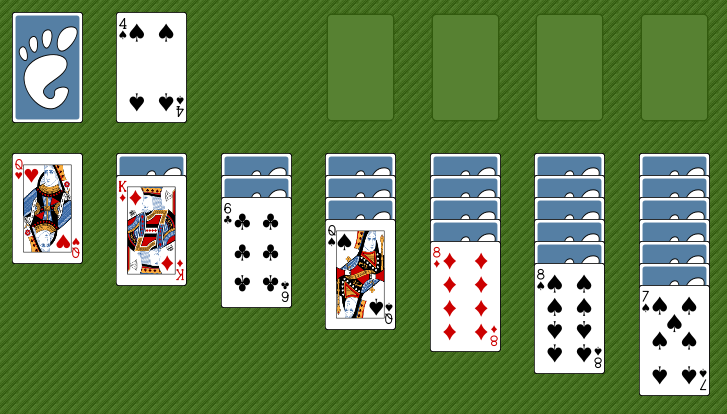
- Cards are dealt into 7 tableau columns — face-down cards beneath, one face-up card on top of each column.
- Move face-up tableau cards onto other face-up cards that are one rank higher and opposite in color.
- Uncover face-down cards by removing the face-up cards above them.
- Move Aces to the four foundation piles and build each suit from Ace up through King to win.
Basic Controls:
- Click to Select: Click a face-up card to select it.
- Click Destination: Click a valid tableau or foundation position to move the selected card there.
- Click Stockpile: Draw cards from the stockpile when no valid tableau moves are available.
- Double-Click: Automatically moves an eligible card to the appropriate foundation pile.
Objective: Build all four foundation piles from Ace to King in suit by organizing the tableau in descending rank, alternating color sequences. Complete all four foundations to win.
3. Google Solitaire Features & Highlights
- ✓ Easy and Hard modes — single-card and three-card draw options provide meaningfully different difficulty characters
- ✓ No time limit — a time tracker records session duration without imposing any pressure
- ✓ Classic Klondike rules — faithful to the universally known solitaire format with no mechanical surprises
- ✓ Alternating-color tableau system — the familiar descending-rank, opposite-color stacking rule drives all tableau organization
- ✓ Instant accessibility — no download, no account required; play immediately on any device
4. Google Solitaire Tips & Strategies
Beginner Tips:
- Move Aces to foundations the moment they appear. An Ace anywhere in the tableau or stockpile should go immediately to its foundation pile. There is never a strategic reason to keep an Ace in the tableau.
- Uncover face-down cards as your primary goal. Every face-down card in the tableau is hidden information and hidden potential. Any move that reveals a face-down card is almost always worth making, even if it's not the "optimal" card placement.
- Don't empty a column unless you have a King ready. Empty tableau columns can only receive Kings. Clearing a column without a King to immediately fill it creates a wasteful gap that provides no benefit until the right card appears.
Advanced Strategies:
- In Hard mode, track which stockpile cards you've passed. Draw-three mode cycles through the stockpile and only shows every third card. Keeping a rough mental note of which important cards you've seen (and approximately where in the cycle they sit) helps you anticipate when to stockpile-cycle and when to wait.
- Build long tableau sequences before sending cards to foundations. A long alternating-color sequence in the tableau is a powerful mobility tool — it moves as a unit, creating large reorganization options. Sending cards to foundations too eagerly can break up sequences you still need for tableau management.
- Use the time tracker as a personal challenge. The timer isn't a pressure mechanic — it's a personal best benchmark. Consistently faster completion times over many sessions reflect genuine improvement in decision speed and quality.
What to Watch Out For:
- Stockpile cycling without progress. In Hard mode especially, repeatedly cycling through the stockpile without making new tableau moves is a sign that the game may be approaching an unwinnable state. If three full stockpile cycles produce no useful cards, evaluate honestly whether the current layout is resolvable.
- Color-clustering in the tableau. The alternating-color rule means a tableau heavy in one color becomes progressively harder to extend. If most of your accessible tableau cards are the same color, look for stockpile draws or foundation sends that introduce the opposite color.
5. Google Solitaire Game Elements Explained
The Easy and Hard Draw Modes: Google Solitaire's difficulty distinction is entirely determined by its stockpile draw mechanics. In Easy mode, clicking the stockpile reveals one card at a time — you see the card, decide whether to play it, and if not, click again for the next. This maximum accessibility means every stockpile card is individually available whenever it appears. In Hard mode, the stockpile reveals cards in groups of three, but only the top of each group is playable. The other two cards in each group are visible but inaccessible until the top card is played (or the pile is cycled through). This constraint forces more reliance on tableau organization rather than stockpile access and rewards players who can plan their tableau moves to defer as many stockpile needs as possible.
The Tableau Organization System: Google Solitaire's tableau follows standard Klondike rules: face-up cards can be placed on other face-up tableau cards that are one rank higher and the opposite color. A red 8 can go on a black 9; a black Queen can go on a red King. Sequences of multiple cards can be moved as a unit if their internal arrangement also follows the alternating-color descending-rank rule. This mobility — being able to move entire sequences rather than single cards — is what enables complex tableau reorganizations when a specific card is buried beneath a manageable stack. The goal is to keep cards in motion: uncovering face-down cards, building useful sequences, and sending cards to foundations without prematurely dismantling tableau structures that still have work to do.
The Time Tracking System: Google Solitaire records the total elapsed time for each session, displayed throughout play. Critically, this timer has no impact on scoring or outcome — it's purely informational. This design correctly identifies timing as a meaningful personal metric (faster completion = more efficient play = more developed solitaire skill) without weaponizing it as a stress mechanism. Players who choose to ignore the timer entirely lose nothing. Players who use it as a personal improvement metric gain a tangible measure of their developing efficiency. The time tracker is the game's nod to competitive self-improvement without any compulsory pressure, which is exactly the right tone for a game designed around relaxed, accessible solo card play.
6. Google Solitaire Frequently Asked Questions
Q: What's the difference between Easy and Hard mode?
A: Easy mode draws one stockpile card at a time, giving you direct access to every card as you cycle through. Hard mode draws three cards at a time but only the top card is playable — the other two are visible but inaccessible until you've played through to them. Hard mode demands more reliance on tableau organization and less on stockpile access.
Q: Can I change modes mid-game?
A: Modes are selected at the start of each new game. Starting a new game resets the board and lets you choose a different mode for that session.
Q: What does the time tracker do?
A: The time tracker records how long your current game session has lasted. It doesn't affect your score or the game's outcome — it's a personal benchmark you can use to track how quickly you're completing games over time.
Q: What should I do when I can't make any tableau moves?
A: Click the stockpile to draw new cards. If the stockpile is exhausted (and in Hard mode, has been fully cycled through), and no tableau moves remain, the game cannot be completed from the current state.
Q: Is Google Solitaire available on mobile?
A: Yes — the click-and-tap interface works fully on mobile browsers, making it accessible on phones and tablets without any download required.